Forum Discussion

dcopeland330
Aug 01, 2024Copper Contributor
Troubleshoot Lettering
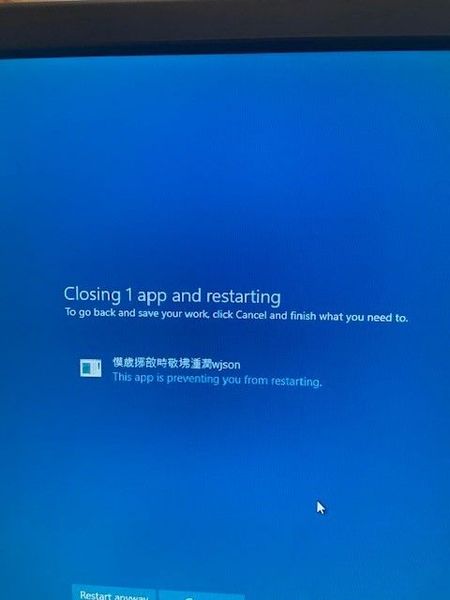
Upon restarting device this pops up. Can anybody Translate?

Skyler-B
Sep 04, 2024Iron Contributor
System Restore: It is recommended that if you have previously created a restore point, you can use the System Restore feature to restore to the previous state.
Restart your computer: Simply restarting your computer can sometimes solve the problem.
Change app language: Some users suggest that if the problem is caused by an app displaying another language, switching to the default English can fix the problem.
Check boot device: If messages such as “No boot device” or “Boot configuration error” appear, you may need to check the hard disk connection or BIOS settings to ensure that the drive is properly prioritized for booting.
Restart your computer: Simply restarting your computer can sometimes solve the problem.
Change app language: Some users suggest that if the problem is caused by an app displaying another language, switching to the default English can fix the problem.
Check boot device: If messages such as “No boot device” or “Boot configuration error” appear, you may need to check the hard disk connection or BIOS settings to ensure that the drive is properly prioritized for booting.