Forum Discussion

Storage full

Hi Glenn56,
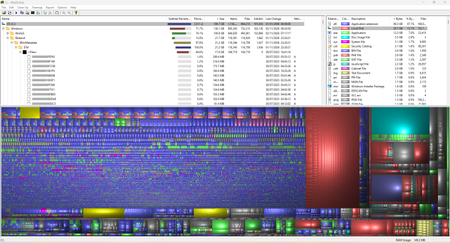
Edge isn't what's filling your drive. Your WinDirStat screenshot points at two Windows system areas instead.
Part 1: NTFS transaction metadata (about 21 GB). C:\$Extend\$RmMetadata\$Txf holds roughly 104,000 tiny files, about 21 GB in total. These are the "tiny purple blocks" and the big red block in your treemap. It's stale transactional NTFS metadata, and Disk Cleanup doesn't see it. Please don't delete it manually. Instead, open Command Prompt as administrator and run:
fsutil resource setautoreset true C:\
Then restart. After that, run "chkdsk C: /f" and let it run on the next reboot. This usually clears the metadata.
Part 2: A very large WinSxS folder (reported as about 100 GB). WinDirStat counts hardlinked files more than once, so this figure is inflated. Your drive has only about 3.5 GB free, though, so the real size is likely well above normal. Check the real size and clean it up with:
DISM /Online /Cleanup-Image /AnalyzeComponentStore
DISM /Online /Cleanup-Image /StartComponentCleanup /ResetBase
If the analysis says the store is corrupt or needs repair, also run:
DISM /Online /Cleanup-Image /RestoreHealth
sfc /scannow
Also worth checking: Disk Cleanup > "Clean up system files" (old Windows Update files); System Restore and shadow copies (vssadmin list shadowstorage); and the hibernation file (powercfg /h off, if you don't use hibernate).
Start with the fsutil step and restart, then run the DISM commands. Please post back what AnalyzeComponentStore reports and how much space you get back.