Forum Discussion

Adonis_K
Jun 08, 2023Tin Contributor
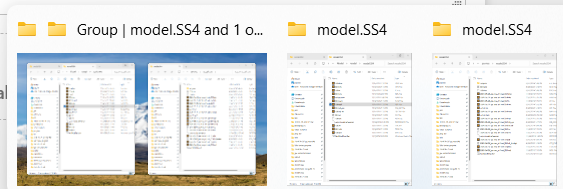
Snapped window groups and individual windows
So Windows 11 introduced the option to group windows by using the snapping layout feature. It also allows you to show the group when alt-tab-ing or when hoving over the windows on the taskbar for ex...

YarotskiU
Nov 16, 2023Copper Contributor
Totally with you on this. Having snap groups appear as one thing in Alt+Tab would be a game changer for keeping things neat and easy to navigate. Why see all those windows separately when you’re thinking of them as one group? This would make flipping through tasks way smoother.

nospamme
Dec 26, 2023Copper Contributor
YarotskiU - not all of us work the same way. I DO want to see all my windows individually on taskbar and never wanted them grouped. After using Win 11 for a while dislike that aspect. Reason: The group windows with small icons is almost unusable and far less efficient for how I work. I do wish that were an option that could be toggled and am not alone in that complaint. I'd rather not have to try to use a suboptimal work-around with two monitors or go to a 43" monitor to do what I used to do better with ungrouped windows within apps on a 27" screen.
 h_xb_luDec 12, 2025Copper Contributor
It's always good to provide extra options for users to choose what they want. It would be beneficial to be able to toggle between 'see individual windows only when they are snapped', 'see snapped groups only', and 'see them all', but I suppose it's rare in many other mainstream systems and mobile OS.
 drkp89Jun 26, 2024Copper Contributor
you can disable Snap Group if you do not want this functionality. However, I do agree that when Snap Group is used, individual windows should not be shown. Currently, there are duplicate windows of the same applications -- those in the Snap Group and those individual. Windows 11 should show one or the other, not both (screenshot).