Forum Discussion

DtheK812
Oct 10, 2021Copper Contributor
Quick Settings Bug
I've just installed Windows 11 on my notebook and I found that my Quick Settings is missing the battery icon and edit button (the one that looks likes a pencil) at the bottom of the panel. I want to ...
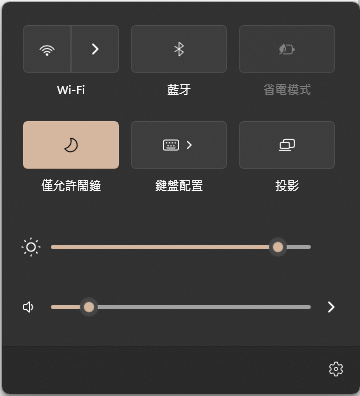
 Oct 23, 2021Hello, I had the same problem as you and tried lots of methods hoping it would be fixed. I even tried performing an in-place upgrade but the bug remained. However, due to frustration, I decided to find registries of the Quick Action Menu and managed to fix it.
Perform it at your own risk.
This fix required you to remove registry keys and it might not work on your device so first, I would like you to backup (export) the keys "Quick Action" under HKEY_CURRENT_USER\Control Panel\ by right-click on it, select export, choose a safe location and give it a name then press OK.
After that, simply delete the key "Quick Action" under HKEY_CURRENT_USER\Control Panel\ and restart your device. It should work but it might be a bit buggy at the beginning, you should wait a bit and if the unresponsiveness is not gone, give it another restart.
If anything goes wrong, simply locate the .reg file I asked you to save earlier, press on it and press YES to restore the key to the state before you tried my method. Hope that helps.

Reza_Ameri
Oct 10, 2021Silver Contributor
It might be a temporary issue and normally, if you restart your PC this issue should be fixed.
You run Windows Update and download and install all updates.
Try open start and search for feedback and open Feedback Hub app and report this issue.
You run Windows Update and download and install all updates.
Try open start and search for feedback and open Feedback Hub app and report this issue.

DtheK812
Oct 11, 2021Copper Contributor
I have tried restarting my PC and have installed all updates but it seems can't solve the bug. I will report it. Thanks anyway!
- Reza_AmeriOct 11, 2021Silver ContributorIt seems like a bug and thank you for filing the report and this way the Windows team would be able to investigate the issue.