Forum Discussion

Question about the "Destination Path Too Long" problem (Windows 11)
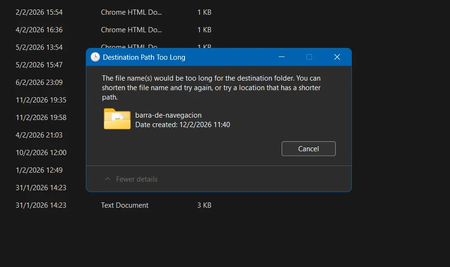

The safer immediate fix is to shorten the source path or move the top-level folder closer to the drive root. That changes no system-wide behavior and works with File Explorer. Windows 11 Home can enable long Win32 paths through the registry, but that setting is not a universal bypass: an application must also declare itself long-path aware, and some shell operations can still reject long paths. If this is recurring, back up the registry, open Registry Editor as administrator, go to HKEY_LOCAL_MACHINE\SYSTEM\CurrentControlSet\Control\FileSystem, and set the LongPathsEnabled DWORD value to 1. Create the value if it is absent, then restart Windows. Test by copying a noncritical sample before moving the real folder. Do not delete or rename files merely to force the operation. If File Explorer still fails, keep the shorter folder structure or perform the move with a trusted long-path-aware application.