Forum Discussion

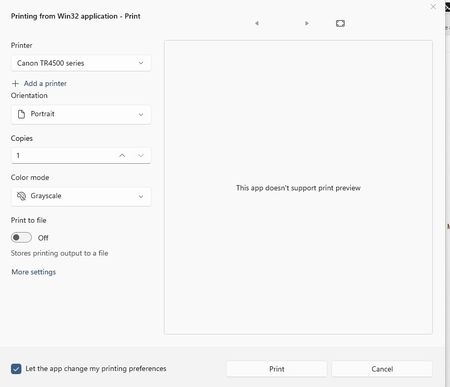
Print dialog will not show Print individual pages.
- May 31, 2026
Hello Steve,
Thank you for posting in the Microsoft Community.
Based on your description, this appears to be a limitation of the current Windows 11 Notepad printing experience rather than an issue with your printer settings. The modern print dialog used by Notepad does not always include the "Pages" section for selecting specific page ranges.
Since the same file shows page-range options in Notepad++, this suggests that your printer supports the feature and that the limitation is specific to Notepad's implementation.
As a workaround, you can:
- Print the file using Notepad++.
- Copy the text into Microsoft Word or another editor that supports page-range printing.
- Check whether a future Notepad update restores this functionality.
I understand how frustrating this can be, especially when the option is available in other applications.
Please let us know if you have any additional questions.
Kind regards,
Kadir O.


Thank you for our answer. Seems dumb to me. And your solutions are the only options I have. However the problem in part I notice is that Notepad++ prints using a differnt font and also the pages are differnt. So I have to try to match the font I suppose to match notpad, if I can.
In other words they stop and start differently so when comparing documents, printed on notepad and notepad++ they are differnt. Some times you are making comparisons between an older printed copy and a new one. I am not a negative person on MS as many are. But I have discovered many things on Win11 which seem like a step backward not forward. As well as some Issues that are real frustrating. Like this one. I use the notepad all the time. Its like they are saying dont use our software use somone elses. Which seem poor salesmanship. I generally like to use what comes with windows as, if im on a nother computer I dont need to install all sorts of 3erd party software.
Anyway thank you. At least I know there is nothing wrong with my comptuer. Hopefully they will fix this at some point. But then again they probably did this for a reason and are going to stick to their guns.
Regards.
- lkadirozcanJun 01, 2026Brass Contributor
Hi Steve,
I completely understand your frustration. If Notepad and Notepad++ are producing different page breaks and layouts, then switching applications isn't an ideal workaround, especially when you're trying to compare against older printed copies.
At least you've confirmed that the issue appears to be with the current Notepad printing implementation rather than your printer or system configuration. Hopefully Microsoft considers adding page-range selection back in a future update, as it seems like a useful feature that many users would still benefit from.
Thanks for sharing the additional details.