Forum Discussion

Print dialog will not show Print individual pages.
- May 31, 2026
Hello Steve,
Thank you for posting in the Microsoft Community.
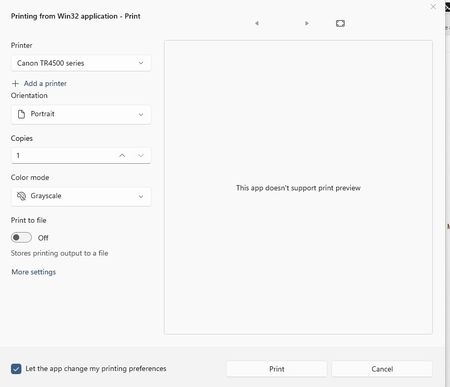
Based on your description, this appears to be a limitation of the current Windows 11 Notepad printing experience rather than an issue with your printer settings. The modern print dialog used by Notepad does not always include the "Pages" section for selecting specific page ranges.
Since the same file shows page-range options in Notepad++, this suggests that your printer supports the feature and that the limitation is specific to Notepad's implementation.
As a workaround, you can:
- Print the file using Notepad++.
- Copy the text into Microsoft Word or another editor that supports page-range printing.
- Check whether a future Notepad update restores this functionality.
I understand how frustrating this can be, especially when the option is available in other applications.
Please let us know if you have any additional questions.
Kind regards,
Kadir O.

Hello Steve,
Thank you for posting in the Microsoft Community.
Based on your description, this appears to be a limitation of the current Windows 11 Notepad printing experience rather than an issue with your printer settings. The modern print dialog used by Notepad does not always include the "Pages" section for selecting specific page ranges.
Since the same file shows page-range options in Notepad++, this suggests that your printer supports the feature and that the limitation is specific to Notepad's implementation.
As a workaround, you can:
- Print the file using Notepad++.
- Copy the text into Microsoft Word or another editor that supports page-range printing.
- Check whether a future Notepad update restores this functionality.
I understand how frustrating this can be, especially when the option is available in other applications.
Please let us know if you have any additional questions.
Kind regards,
Kadir O.