Forum Discussion

RajendraGavel
Apr 01, 2022Copper Contributor
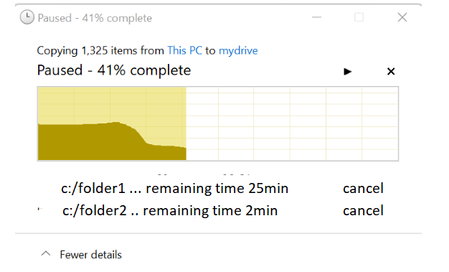
Microsoft windows copy-past process can improve further
Hi All, I am MS window user , currently using window 11, also I am developer in a organization, when I am trying to copy multiple file or folders from one location to another location if the files s...

EricStarker
Apr 01, 2022Former Employee
RajendraGavel Hello! You've posted your question in the Tech Community Discussion space, which is intended for discussion around the Tech Community website itself, not product questions. I'm moving your question to the Windows 11 space - please post Windows 11 questions here in the future.
 RajendraGavelApr 01, 2022Copper Contributor
SureEricStarker
 My_profileOct 25, 2023Copper ContributorWin11 Pro Users on D:\
(this is a reply to a different question than my own question, but when I tried to post my own question I got the error "please correct highlighted errors and post again. There were no errors highlightes, but I found a posting saying I might succeed in posting it as a reply, which I am doing here. Microsof please fix this!)
I have a fresh Win11 Pro install on an NvME drive (C:\ drive). I have only one user now (myself/Administrator), but I will be adding other users on my family LAN, and I will need more storage than is available on my C:\ drive, so I added and NTFS formatted a second larger NvME D:\ drive to hold all my and their home folders. Can someone explain the method and step by step procedure to get the Users folder itself plus my and all future home directories and sub-directories users on the the new D:\ drive (ie. hopefully rather than having to move each user's home directories and sub-directories one-by-one). I can't be the only person needing to know this, so a link and/or howto do this would be great.
Thx, Rodolfo