Forum Discussion

macOS monterey download for creating a bootable usb installer?
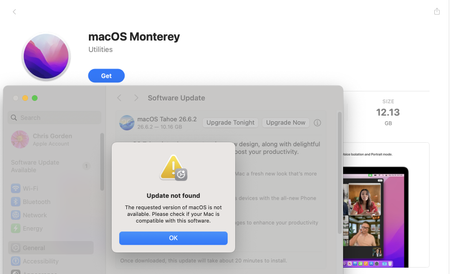

macOS Monterey (macOS 12) has a specific list of supported Macs. Here's what you need to know:
https://support.apple.com/en-us/103260
Get an old Mac that compatible with Monterey in order to download macOS Monterey installer app on Mac.
A Mac mini (Late 2014) or a MacBook Air (2015) tend to be the cheapest entry points since they were budget-friendly to begin with and are now old enough to be inexpensive secondhand.
How to download macOS Monterey installer
1. Once you have a compatible Mac:
2. Open System Settings/Preferences → Software Update (if it's already on an OS that supports it), or
3. Go to the Mac App Store and search "macOS Monterey" — Apple still hosts it there
4. It'll download as "Install macOS Monterey.app" into your Applications folder
One thing worth flagging: if your goal is just to get the installer app itself (not to run Monterey daily on that machine), the Mac you buy just needs to be able to download it via the App Store — it doesn't need to be your daily driver. Even an older machine running Monterey already, or one on Big Sur/Catalina that can still access the Monterey listing in the App Store, would work.