Forum Discussion

Zoeiur
Sep 13, 2026Brass Contributor
macOS monterey download for creating a bootable usb installer?
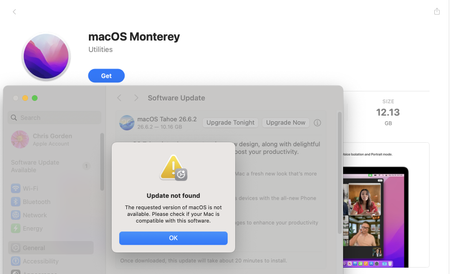
MacBook Pro was broken and unable to boot into the desktop. I have another Mac but can't download macOS Monterey installer app, as it says: The requested version of macOS is not available. Please c...

Sawyeryo
Sep 13, 2026Iron Contributor
How about using the "Manual Extraction" method for macOS Monterey dmg download. This "Manual Extraction" approach is genuinely clever, but let's be honest about what it actually is: a workaround for people who don't have a Mac handy and still need a macOS Monterey dmg download to work with on a Windows machine.
- The 7-Zip + Command Prompt trick is real — you can crack open the .dmg, dig out Install ESD.dmg, and then use diskpart to prep the USB. But a few things worth flagging:
- It's fragile. If your macOS Monterey dmg download is corrupted or incomplete, 7-Zip will either fail silently or extract a broken Install ESD.dmg, and you won't find out until the Mac refuses to boot from it.
- diskpart isn't a formatter for Mac filesystems. You can create the GPT partition and set it active, but Windows can't write HFS+ or APFS natively — so the actual "restore" step still needs Trans Mac or a similar tool. The manual extraction only gets you the payload; it doesn't get it onto the USB in a bootable form.
- It's a one-way street. This method produces a USB installer, nothing more. No recovery partition, no verification, no fallback if something goes wrong mid-write.
So yeah — it works, and it's a fun exercise in "how far can I push Windows beyond its comfort zone." But if you just want a bootable Monterey installer and you're on Windows, Trans Mac + a clean macOS Monterey dmg download is still the path of least resistance. The manual method is for tinkerers, not for people who need it to work on the first try.