Forum Discussion

Zoeiur
Sep 13, 2026Brass Contributor
macOS monterey download for creating a bootable usb installer?
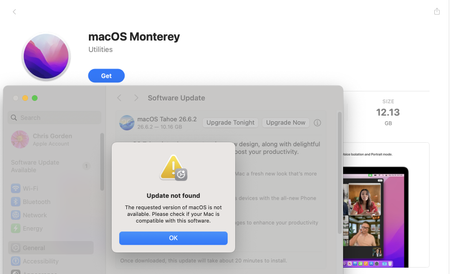
MacBook Pro was broken and unable to boot into the desktop. I have another Mac but can't download macOS Monterey installer app, as it says: The requested version of macOS is not available. Please c...

Xaviery
Sep 13, 2026Brass Contributor
About the macOS Monterey download, this method is considered challenging for many users because it requires using the Terminal and typing out a long, precise command. However, it is completely free, official, and uses no third-party software.
The exact command for macOS Monterey is:
sudo /Applications/Install\ macOS\ Monterey.app/Contents/Resources/createinstallmedia --volume /Volumes/MyVolume
The steps to make this work are if you are finding a macOS Monterey download:
- Download the Installer: You must first get the "Install macOS Monterey.app" file. You can download it directly from the Mac App Store. Once downloaded, it should appear in your Applications folder. If the installer opens automatically, just quit it (Command + Q) without proceeding.
- Prepare Your USB Drive: Insert a USB drive with at least 16 GB of storage. Important: The process will erase everything on this drive, so back up any important data first.
- Open Terminal: Go to Applications > Utilities and open Terminal.
- Run the Command: Copy and paste the exact command above into Terminal. You must replace /Volumes/MyVolume with the actual name of your USB drive. The easiest way to do this is to type --volume /Volumes/ in the Terminal, then drag your USB drive icon from your Desktop into the Terminal window. It will automatically fill in the correct path.
- Execute and Confirm: Press Enter. You will be prompted for your administrator password (it won't show as you type). Then, you will be asked to confirm that you want to erase the drive. Type y and press Enter again.
The process will take some time. When it's finished, the Terminal will display "Done," and your USB drive will be renamed to "Install macOS Monterey".