Forum Discussion

Lock Screen UI mis-scaled and put itself in the corner
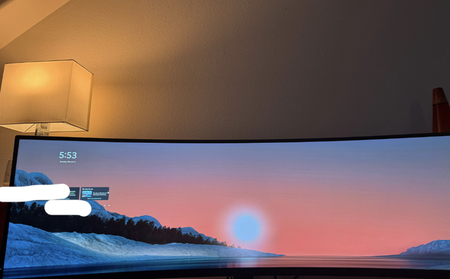

It sounds like your lock screen is not displaying correctly and is being pushed to the corner of the screen. This could be due to a display issue or a graphics driver problem.
Here’s what you can try to fix it:
Restart your computer: Sometimes a simple restart can fix display glitches.
Check your display settings: Right-click on the desktop, go to Display Settings, and make sure the screen resolution is correct for your monitor.
Update your graphics drivers: Outdated drivers can cause display issues. Go to Device Manager, find your graphics driver, and check if there are any updates.
Adjust Scaling: Go to Display Settings and under Scale and Layout, try adjusting the scaling to 100% or another setting that fits your screen betterhttps://www.brownstonelaw.com/appellate-lawyer/florida-appeals/
These steps should help resolve the mis-scaled lock screen issue.