Forum Discussion

Zubairro
Jul 17, 2024Copper Contributor
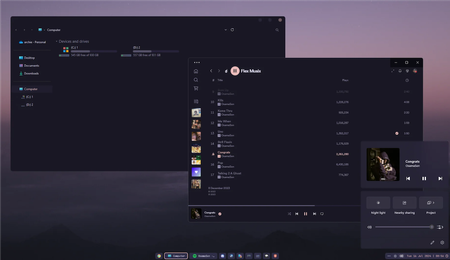
How abou this customzied taskbar on Windows 11 based on XAML?

Jasonnmiz
Oct 01, 2024Iron Contributor
1. Customization Tools: There are a number of third-party tools on the market today, such as TaskbarX and AquaSnap, which allow users to deeply customize the Windows 11 taskbar. These tools offer the ability to adjust the position and size of the taskbar as well as add additional functionality.
2. Application of XAML: Windows 11's taskbar is built on XAML, which means developers can use XAML and C# to create a more personalized and feature-rich taskbar experience. This approach provides great flexibility for advanced users and developers.
3. Built-in system features: Windows 11 itself provides some basic taskbar customization options. Users can adjust the arrangement and size of the buttons, as well as the position of the taskbar in the taskbar settings
2. Application of XAML: Windows 11's taskbar is built on XAML, which means developers can use XAML and C# to create a more personalized and feature-rich taskbar experience. This approach provides great flexibility for advanced users and developers.
3. Built-in system features: Windows 11 itself provides some basic taskbar customization options. Users can adjust the arrangement and size of the buttons, as well as the position of the taskbar in the taskbar settings