Forum Discussion

Headset option missing from desktop
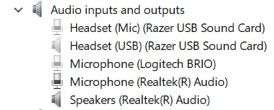

This usually happens when Windows detects the headset as regular speakers instead of a separate headset device. Try these steps:
Install or update the latest Realtek audio driver from MSI's support website for your motherboard.
Open the Realtek Audio Console (or Realtek HD Audio Manager) and check if you can set the front/rear audio jack as Headset instead of Speakers.
Go to Settings → System → Sound and verify the correct playback device is selected.
If the old Razer USB Sound Card keeps reappearing, uninstall its software and drivers completely if you're no longer using it.
Restart your PC after making these changes.
If the issue persists, please let us know whether the headset is connected to the front panel or rear audio jacks, and whether you are using Windows 10 or Windows 11.