Forum Discussion

DeadStack
Jul 17, 2026Brass Contributor
Headset option missing from desktop
When I look at audio device options in the taskbar config popup and 'select a sound input' I only see speakers. Both my speakers and headset are plugged in. I have an MSI MAG X570 Tomahawk Wifi - it ...

sarahcollins
Jul 17, 2026Tin Contributor
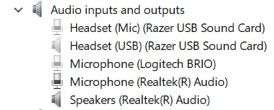
If your new headset uses the motherboard's analog jacks instead of USB, Windows probly won't show it as a separate playback device. It usually just treats it as the Realtek audio output, unlike a USB headset which appears as its own device. I'd check the Realtek Audio Console.. There's often an option asking what device was plugged into the fron or rear audio jack. If the jack is detected as Speakrs instead of Headphns, you can usually change it there. I'd also make sure Speaker Configuration isn't still set to 5.1, because stereo headphones can miss channels if surround audio isn't being downmixed seperately. If none of that helps, it sounds more like a Realtek driver/jack detection issue than a Windows one.