Forum Discussion

Headset option missing from desktop
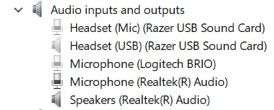

Your new headset uses separate 3.5 mm headphone and microphone jacks, so Windows treats the headphones as part of the Realtek Speakers device, not as a separate "Headset" playback device. The Headset (USB) / Headset (Mic) (Razer USB Sound Card) entries are from your old USB headset (or its USB sound card). If you no longer use it, unplug it and remove the device from Device Manager. If it keeps reinstalling, check for leftover Razer Synapse software or drivers. The reason you're hearing missing channels in some 5.1 content is likely because the Realtek output is configured for surround sound instead of stereo/headphones. Since a standard analog headset only has two speakers, Windows should be configured for Stereo with headphone virtualization (Windows Sonic or Dolby Atmos, if desired).
I'd recommend checking:
- Control Panel → Sound → Playback → Speakers (Realtek Audio) → Configure and make sure it's set to Stereo, not 5.1.
- Install the latest Realtek audio driver from MSI's support page for the MAG X570 Tomahawk WiFi, rather than relying on the generic Windows driver.
- If your case has separate front-panel headphone and speaker jacks, open Realtek Audio Console and enable "Make front and rear output devices play two different audio streams simultaneously" (if available). This lets you independently use speakers and headphones.
With an analog twin-jack headset, it's normal that Windows doesn't show a separate "Headphones" playback device unless the Realtek driver exposes one. The playback device remains Speakers (Realtek Audio).
MSI Driver Downloads: https://www.msi.com/Motherboard/MAG-X570-TOMAHAWK-WIFI/support
Microsoft - Change speaker configuration: https://support.microsoft.com/windows/fix-sound-or-audio-problems-in-windows