Forum Discussion

Gamvanni
Jul 20, 2026Tin Contributor
Files that are hidden from view but still occupy disk space
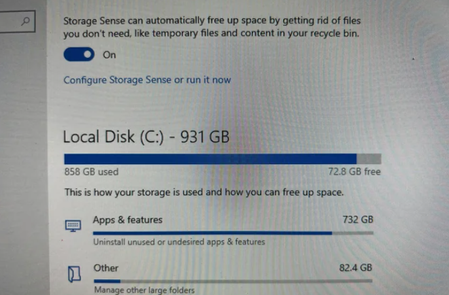
I have files on my Windows PC that are completely hidden from File Explorer and don't show up anywhere I look, yet they are still taking up a significant amount of disk space. I need a way to loc...

EmilioJ1990
Jul 20, 2026Copper Contributor
This usually happens because the space is being used by system or protected files that File Explorer doesn’t show by default, or by data that’s stored outside your user folders.
I’d check a few things first:
- In File Explorer, go to View > Show > Hidden items to display hidden files.
- Open Folder Options > View and temporarily uncheck “Hide protected operating system files (Recommended)”. Be careful not to delete anything unless you’re sure what it is.
- Go to Settings > System > Storage and review the storage categories. They often point you to large folders, temporary files, Windows Update cleanup, or system files.
- Run Disk Cleanup (or Storage Sense) to safely remove temporary files, Windows Update leftovers, and other unnecessary data.
If you’re still missing hundreds of gigabytes after that, the space may be used by things like:
- System Restore points or Shadow Copies
- The page file (pagefile.sys) or hibernation file (hiberfil.sys)
- Virtual machine images
- Hidden application data under ProgramData or AppData
If you can share which version of Windows you’re using and whether the missing space is on an HDD or SSD, it will be easier to narrow down the cause.