Forum Discussion

pjakl
Sep 03, 2022Copper Contributor
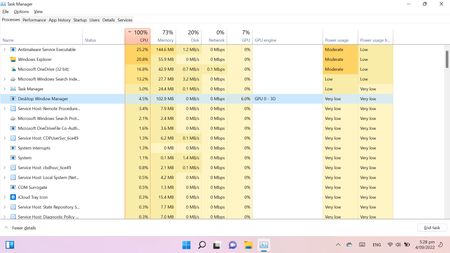
Cpu usage running at 100%
i have attach a copy of my task manager screen my CPU is running a 100% just wondering whether some one can help me to fix the problem I have done a disk clean but it is still not working ...

KapilArya
Sep 04, 2022MVP
Hello,
Suggest you to run System File Checker scan:
1. Search for 'command prompt' using Windows Search.
2. From results, right click on Command Prompt and select Run as administrator.
3. Type sfc /scannow command and press Enter key.
4. Let the command complete and then reboot the machine.
If issue still persists, see if this fix helps you anyway:
https://www.kapilarya.com/fix-100-cpu-usage-in-windows-11
Let us know if this helps!
Note: Included link in this reply refers to blog post by a trusted Microsoft MVP.