Forum Discussion

Cinder_Wanderer
Jun 26, 2026Copper Contributor
Can't extend or shrink my C: Drive
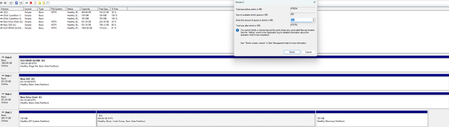
I tried shrinking my C: drive in Disk Management, but it only lets me shrink it by 282 MB despite having more than 165 GB of free space.

BartSchoovaerts
Jun 28, 2026Tin Contributor
Most likely caused by - Unmovable file near end of C:
Try these steps:
Disable hibernation.
Open an elevated command prompt: powercfg -h off
Then temporarily disable the page file:
System Properties
→ Advanced
→ Performance
→ Advanced
→ Virtual Memory
Then Defrag once: defrag c: /x
Reboot and check shrink space again.
Sometimes you'll suddenly get 100+ GB available.
If this fails, try Hiren bootCD (USB version)