Forum Discussion

Dustincrui
May 11, 2026Iron Contributor
Auto-snapping overlay on Windows 11 computer?
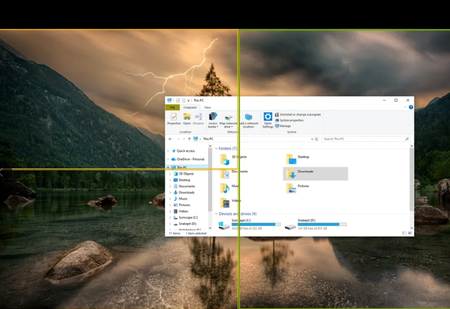
Every time I move a File Explorer window over to my second monitor, this weird overlay appears over the screen and automatically re-sizes the window to fit in one of the highlighted areas. I ...

DravenPierce
May 11, 2026Iron Contributor
Look for any screen management, window snapping, or desktop enhancement tools installed on your PC, such as DisplayFusion, AquaSnap, PowerToys, or similar utilities.
 seunaiconsulting26May 11, 2026Tin Contributor
That's Snap Layouts, a Windows 11 Snap feature. Disable it under:
Settings— System —Multitasking—Snap windows
Turn off "Show snap layouts when I drag a window to the top of my screen" and "When I drag a window, let me snap it without dragging all the way to the screen edge." The second one is usually what causes the mid-screen overlay you're describing.