Forum Discussion

Barbarank
Apr 23, 2025Iron Contributor
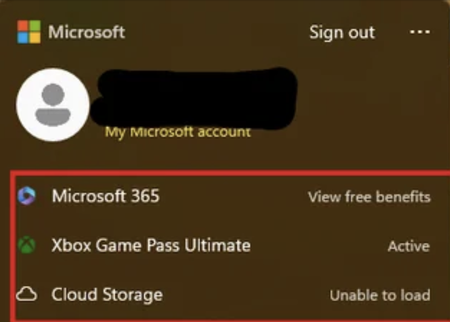
Any way to delete Microsoft 365, Xbox, and Cloud Storage on profile window
How can I get rid of these permanently? I have removed them before, like a year ago, but they came back. I don't need Windows asking me around every corner whether I want to purchase more crap from t...

Sundarpic
Apr 23, 2025Iron Contributor
1. Hide the account center icon
Registry modification:
Win + R type regedit
Navigate to:
HKEY_CURRENT_USER\Software\Microsoft\Windows\CurrentVersion\Policies\Explorer
Create a new DWORD (32-bit) value → name it HideCloudStorage → set the value to 1.
Restart the computer to take effect
2. Completely remove
Remove completely (requires administrator privileges)
# Uninstall pre-installed applications (one by one)
Get-AppxPackage *Microsoft.Office* | Remove-AppxPackage
Get-AppxPackage *XboxApp* | Remove-AppxPackage
Get-AppxPackage *OneDrive* | Remove-AppxPackage
3. Authentication
Re-open Start Menu > User Profile and verify that the icon disappears