Forum Discussion

Enzoiev
Aug 29, 2024Tin Contributor
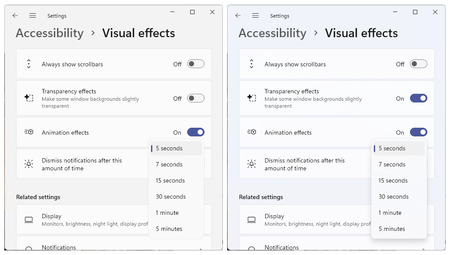
Any one see shows under visual effect on Windows 11?
 Sep 01, 2024
1.In Windows 11, you can customize interface visuals like animations and transparency under “Visual Effects” in the Accessibility settings. Here’s how to access them:
2.Open Settings (Win + I) or right-click the Start button and select “System.”
Go to “Accessibility” and scroll down to “Visual effects.”
Toggle options such as “Show animations in Windows,” “Enable transparency effects,” “Show shadows under windows,” and “Show accent color.”
If these options are missing, check your system configuration or update Windows to the latest version

Ophelias
Sep 03, 2024Tin Contributor
Press the Windows key or click on the Start button, and then select Settings (the gear icon).