Forum Discussion

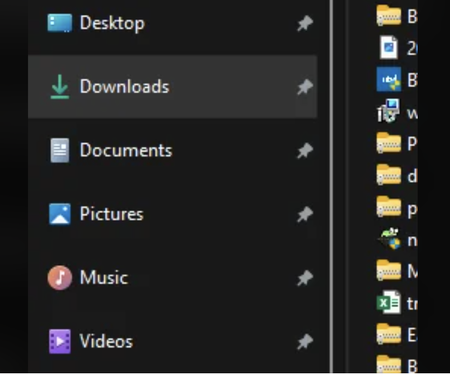
After the recent update, the items in the explorer navigation pane became quite spread out

samfostergoggin Yes. And yes, the only two users with PDM have been affected. Other users don't use PDM and have not been affected.

There was another thread like this in which folks realized everyone affected seemed to have solidworks installed on their machines. I don't have a solution yet but I'm sure it has something to do with PDM. Someone on reddit suggested updating to windows 11 version 24H2 had solved the problem for them, so I'm in the process of trying that myself now
 mtiedemanOct 19, 2024Copper Contributor
As experienced by others my work PDM machine has the large spacing issue while my personal machine on the same network without PDM is close spaced. I don't have 24H2 available yet and am anxiously awaiting its arrival.
 A1349267Oct 23, 2024Copper Contributor
I had Solidworks installed when my computer updated today 10/23/24. All my quicklinks in the file folder were super spaced out. I chose the option in View to condense the spacing and had minimal change. I turned off the touchscreen option with no change. I uninstalled Solidworks and restarted and had no change. Not sure what the issue is but its driving me nuts.
 mlevainOct 24, 2024Copper Contributor
As explained in the previous answers, simply install the 24H2 update to solve this problem :
https://www.windowslatest.com/2024/10/01/how-to-install-windows-11-24h2-now-available-for-everyone/
- mlevainOct 11, 2024Copper Contributor
samfostergoggin Thank you very much for your advice, I'm also going to run the 24H2 update to see.
- mlevainOct 11, 2024Copper Contributor
I can confirm that the 24H2 update solves the problem !!! 😃
- aoleary1980Oct 13, 2024Copper Contributor
Seems the problem was gone and then I logged in to PDM for the day and the problem started...
Will pester IT to updated to 24H2