Forum Discussion

Alamo_308
Jun 14, 2025Copper Contributor
Advanced Folder Properties
Why is the "Encrypt contents to secure date" check-box not enabled? How do I enable the check-box?
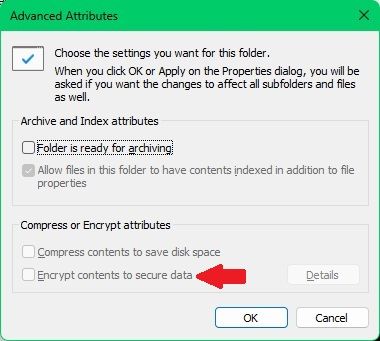

Jun 16, 2025
chk these and try
1.Check Windows Edition
- Go to Settings > System > About
- Under Windows specifications, check your Edition
- If it's Home, EFS is not supported.
2.Check File System Type
- Open File Explorer > This PC
- Right-click the drive > Properties
- Check if it's NTFS. If not, EFS will be unavailable.
3.Enable via Group Policy (if applicable)
If you're on a Pro or Enterprise edition and EFS is still not working:
- Press Win + R, type gpedit.msc, and press Enter
- Navigate to:
Computer Configuration > Windows Settings > Security Settings > Public Key Policies > Encrypting File System - Double-click and ensure “Do not allow encryption” is not enabled
4.Check if Folder Is Compressed
EFS and NTFS compression cannot be used at the same time.
- Right-click folder > Properties > Advanced
- If “Compress contents to save disk space” is checked, uncheck it, then retry enabling EFS.
Optional: Enable EFS via Command Line
bash
CopyEdit
fsutil behavior set disableencryption 0
Then restart your computer, and check if the option is now enabled.