Forum Discussion

Windows won't boot - error code 0xc000000e - windows system32 winload.efi
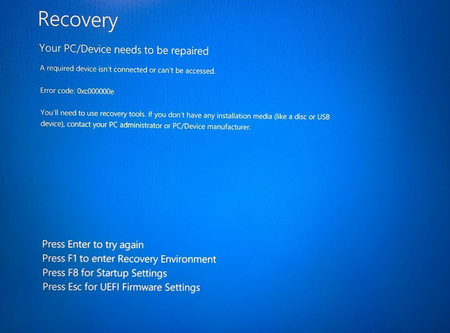
- Nov 19, 2024
Yikes, that sounds like a real nightmare. If your Windows and boot files are missing and you can’t even locate them, it’s tricky but might still be fixable. Here's what you could try:
- Check Partition Table Type: Since Disk 0’s type shows FAT32, it’s probably UEFI (GPT). You can confirm with diskpart:
Run diskpart, then list disk.
If there’s no asterisk under "GPT," it’s MBR. Otherwise, GPT. - Assign EFI Partition a Drive Letter:
In diskpart, list vol to find the EFI volume (FAT32).
Use select vol X (replace X with the EFI partition number).
Then assign letter=V. - Manually Rebuild Boot Files:
Run:bashcd /d V:\EFI\Microsoft\Boot\ bootrec /fixboot bcdboot C:\Windows /s V: /f UEFIcd /d V:\EFI\Microsoft\Boot\bootrec /fixbootbcdboot C:\Windows /s V: /f UEFI
- If access is denied on /fixboot, try this first:
bashbootsect /nt60 V: /force
Have you tried running a recovery tool yet to see if your Windows folder is intact? It might reveal if the OS is salvageable. Let me know how it goes!
- Check Partition Table Type: Since Disk 0’s type shows FAT32, it’s probably UEFI (GPT). You can confirm with diskpart:


I am trying to get a duplicate drive, and I have hit this error. However, when I try to follow the prompt from my boot manager, it instructs you to insert your installation disk (just created), choose settings, and click next. Select "Repair your computer".
The just created installation disk hits the same error 0xc000000e.
I can get to the new drives only with the original drive as a boot drive. My Partition Manager shows the disks as follows:
Copyright (C) 1999-2008 Microsoft Corporation.
On computer: PAUL-530-WIN7
DISKPART> list disk
Disk ### Status Size Free Dyn Gpt
-------- ------------- ------- ------- --- ---
Disk 0 Online 114 GB 0 B
Disk 1 Offline 232 GB 1024 KB
DISKPART> select disk 1
Disk 1 is now the selected disk.
DISKPART> online 1
Microsoft DiskPart version 6.1.7601
DISK - Online a disk that is currently marked as offline.
VOLUME - Online a volume that is currently marked as offline.
DISKPART> online disk 1
The arguments specified for this command are not valid.
For more information on the command type: HELP ONLINE DISK
DISKPART> list disk
Disk ### Status Size Free Dyn Gpt
-------- ------------- ------- ------- --- ---
Disk 0 Online 114 GB 0 B
* Disk 1 Online 232 GB 1024 KB
DISKPART> list part
Partition ### Type Size Offset
------------- ---------------- ------- -------
Partition 1 Primary 664 MB 31 KB
Partition 2 Primary 232 GB 664 MB
DISKPART> list volume
Volume ### Ltr Label Fs Type Size Status Info
---------- --- ----------- ----- ---------- ------- --------- --------
Volume 0 D DVD-ROM 0 B No Media
Volume 1 System Rese NTFS Partition 324 MB Healthy System
Volume 2 C NTFS Partition 114 GB Healthy Boot
Volume 3 F System Rese NTFS Partition 664 MB Healthy
Volume 4 E NTFS Partition 232 GB Healthy
Volume 5 G GSP1RMCPRFR NTFS Removable 115 GB Healthy
DISKPART> list disk
Disk ### Status Size Free Dyn Gpt
-------- ------------- ------- ------- --- ---
Disk 0 Online 114 GB 0 B
* Disk 1 Online 232 GB 1024 KB
Disk 2 Online 115 GB 0 B
DISKPART>
How can I get the boot sector changed in this setup?