Forum Discussion

Windows was unable to get a list of devices from Windows Update.
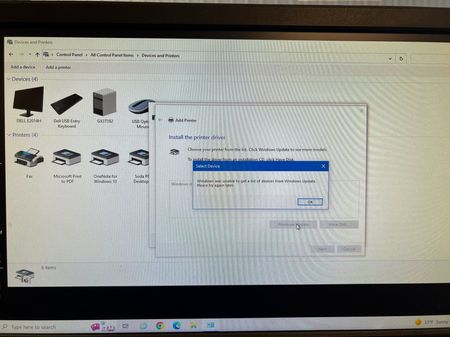

After a lot of trial and error, I was able to use this cab file after following these instructions from the hp website.
https://support.hp.com/hr-en/document/c04745752#AbT4
Then select "https://support.hp.com/hr-en/document/c04745752#AbT4
When you get to the "Microsoft Update Catalog" search for "hp laserjet 2100 pcl6"
I downloaded the first one on the list, drivers_af41d239df5205c515b59d342f910a4a916e54b9.cab
Using Windows PowerShell
cd Downloads
mkdir drivers
expand drivers_af41d239df5205c515b59d342f910a4a916e54b9.cab -F:* drivers
Add Printer and use "Have Disk" when presented with Windows Update or Have Disk", select the drivers directory, select "hp laserjet 2100 pcl6.
If you don't have that printer search for yours, should work the same way.
Now I can print!
 Gerard_BartleyJan 29, 2023Copper Contributor
What is the destination for the file copy? Thanks.
 JesseR3501Jan 12, 2023Copper ContributorDoe it really need to be done through Windows power shell? I fill like through the Add Printer UI you can still select your own driver.