Forum Discussion

Windows Update says my pc doesn't meet windows 11 requirements
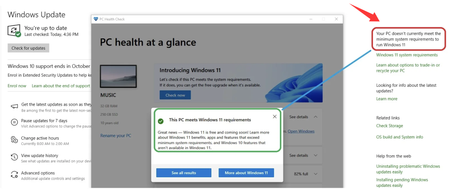

W11Upgrade is a free PowerShell script available on GitHub that can help you upgrade to Windows 11 even when Windows Update says it doesn't currently meet the minimum system requirements to run Windows 11. It works by automating the process of launching the Windows 11 Installation Assistant with specific command-line parameters designed to bypass the compatibility checks. If you're facing the situation where Windows Update says it doesn't currently meet the minimum system requirements to run Windows 11, this tool offers a potential workaround.
Follow these steps to use the script. It's a straightforward process, but it requires you to be comfortable with a few technical steps:
- Download the Script: Go to the Coach40oz/W11Upgrade repository on GitHub and download the Win11Upgrade.ps1 file.
- Run PowerShell as Administrator: Search for PowerShell, right-click on it, and select "Run as administrator". Running with administrator privileges is essential for the script to make the necessary system changes.
- Run the Script: In the PowerShell window, type .\Win11Upgrade,ps1 and press Enter. The script will then take over the process.
- Wait for Completion: The script downloads the necessary files and performs an in-place upgrade. The total time can range from 1 to 4 hours, depending on your internet speed and hardware. The system will automatically reboot when the process is finished.
You don't need to manually download or manage a Windows 11 ISO file. The script handles the download and installation process automatically. However, even in the official methods, Microsoft has documented the need for registry tweaks to bypass restrictions. It's important to know that Microsoft does not recommend installing Windows 11 on unsupported hardware. They caution that it may affect your system's security, stability, and the ability to receive future updates. Running on unsupported hardware means you won't have access to official support.