Forum Discussion

Windows Update says my pc doesn't meet windows 11 requirements
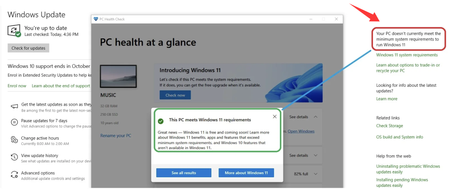

If Windows Update says it doesn't currently meet the minimum system requirements to run Windows 11, using FlyOOBE is indeed a viable solution for bypassing this restriction. It's the modern successor to Flyby11, designed specifically to help you install Windows 11 on older or unsupported hardware by skipping checks for TPM, Secure Boot, and CPU compatibility.
How FlyOOBE Works
- Bypass Mechanism: FlyOOBE automates a method that uses the Windows Server installation mode, which has less stringent hardware requirements, to install the standard version of Windows 11. You don't need to perform manual registry edits or complex workarounds.
- Additional Features: Beyond bypassing the checks, FlyOOBE is a full toolkit that lets you customize the "Out-Of-Box Experience." It can remove bloatware, disable AI features like Co pilot, and choose which apps to install, all from a single, easy-to-use interface.
- Ease of Use: The tool is portable (no installation required), and it can automatically download the official Windows 11 ISO from Microsoft servers to start the upgrade process.
FlyOOBE is a powerful and user-friendly tool to bypass the Windows 11 hardware checks, allowing you to upgrade a PC even when Windows Update says it doesn't currently meet the minimum system requirements to run Windows 11. It's ideal for giving an otherwise functional PC a second life. However, you must be comfortable with the inherent security risks and the uncertainty surrounding future updates. If your system is mission-critical or contains sensitive data, the official recommendation is to consider buying a new PC that meets the requirements or continuing with Windows 10 (which has extended security updates available).