Forum Discussion

Windows Update says my pc doesn't meet windows 11 requirements
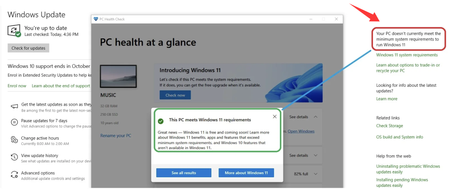

Windows‑based tools cannot toggle low‑level platform settings, so you must enter motherboard firmware when PC Health Check says my PC is compatible but Windows Update says it doesn't currently meet the minimum system requirements to run Windows 11, as these options live inside BIOS/UEFI.
It allows you to activate the two mandatory Windows 11 prerequisites, but using this feature requires pressing the correct boot‑time hotkey to open firmware setup.
Instructions: Restart your computer → During startup, press the F2, Del, F10, or Esc key to enter the BIOS/UEFI. Look for Security or Advanced settings. Find TPM, Intel PTT, or AMD fTPM → Set it to Enabled. Find Secure Boot → Set it to Enabled. Save and exit. After enabling these settings, restart Windows 10 and run Windows Update again. The update should now install successfully.
Its advantages include: providing a permanent, official firmware-level fix that does not require third-party patching tools, and resolving most update issues caused by a disabled TPM or Secure Boot.
Its disadvantages include: BIOS hotkeys vary by PC brand, the user may miss the brief window of opportunity during startup, incompatibility with older motherboards that do not support PTT/fTPM, and the fact that Secure Boot, once enabled, may block unsigned boot media.
Notes
- Before making any changes, make a note of your original BIOS settings so you can easily revert them if necessary.
- Secure Boot typically requires a GPT disk partition structure; this option cannot be enabled on MBR systems.
- After saving and exiting, restart your computer completely once, then run Windows Update.
- If certain options are grayed out, check to see if there is a main switch labeled “Secure Device Support” at the top of the BIOS menu.
This addresses firmware‑induced conflicts behind PC Health Check says my PC is compatible but Windows Update says it doesn't currently meet the minimum system requirements to run Windows 11. It is suitable for users comfortable navigating BIOS menus, as well as for PCs whose hardware already meets Windows 11 specifications.