Forum Discussion

Windows Update says my pc doesn't meet windows 11 requirements
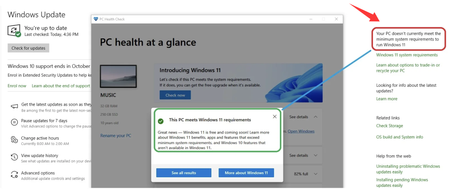

Sometimes Windows Update may show a compatibility warning even when the official hardware checker reports that the computer can run Windows 11. This situation can happen because different Microsoft tools use different checks or because Windows Update has not refreshed the compatibility status yet. The issue of PC Health Check says my PC is compatible but Windows Update says it doesn't currently meet the minimum system requirements to run Windows 11 is not uncommon.
One workaround is to use the Windows 11 Installation Assistant instead of waiting for Windows Update. Download the tool from Microsoft’s official Windows 11 download page, open it, and follow the on-screen instructions. The assistant will perform another compatibility check and may provide a more detailed reason if the upgrade is blocked.
If the installation assistant still reports that the device is not supported, check the specific message shown, such as TPM being disabled, Secure Boot settings, or an unsupported processor. These details can help identify why PC Health Check says my PC is compatible but Windows Update says it doesn't currently meet the minimum system requirements to run Windows 11 even though the hardware appears ready.