Forum Discussion

Windows Update says my pc doesn't meet windows 11 requirements
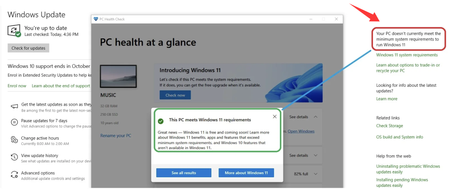

PC Health Check is checking whether the hardware meets Windows 11’s basic requirements. Windows Update does a separate check before it offers the upgrade. It also considers its cached compatibility data, pending updates, and known driver or software blocks. That is why the two screens can sometimes disagree.
Start by opening PC Health Check and selecting See all results. Make sure TPM 2.0, Secure Boot, the processor, RAM, and storage all show as supported. Then install all available Windows 10 updates, restart the PC, and make sure there is at least 25-30 GB of free space. After the restart, return to Windows Update and select Check for updates again.
If Windows Update still shows the same message but PC Health Check remains fully green, use Microsoft’s official Windows 11 Installation Assistant. This is the simplest way to find out whether the PC is actually eligible. If the assistant accepts the PC, the Windows Update message was likely stale or caused by a temporary compatibility hold, and the upgrade can continue through the assistant.
If the Installation Assistant also refuses the upgrade, read its exact reason. It will normally point to the setting or requirement that still needs attention, such as TPM being disabled in BIOS, Secure Boot being off, or an unsupported processor.