Forum Discussion

Windows Defender Application Guard with AMD CPU (Pro, 1909 Build) problem
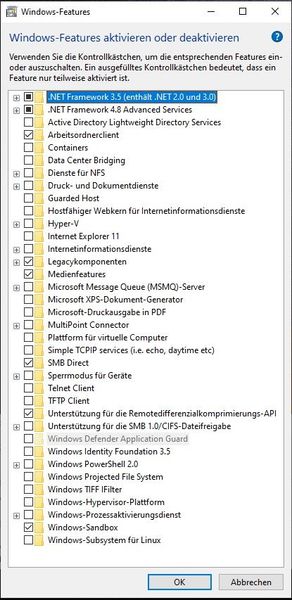

Deleted
Deleted wrote:
Now i set the RAM recommended hardware configuration to 0GB, reboot and it fully works.
But still don't know why Windows think i have 0GB RAM. The logic looks corrupt
Taskmanager even say i have 16GB and ATM 12GB are free.
Nice, that's good,
would you mind mentioning how you managed to modify the recommended RAM for WDAG?
I think you should report it in the Feedbacks hub app and add your even viewer file to your feedback.
I hope they read this here.
HotCakeX wrote:Deleted
Deleted wrote:
Now i set the RAM recommended hardware configuration to 0GB, reboot and it fully works.
But still don't know why Windows think i have 0GB RAM. The logic looks corrupt
Taskmanager even say i have 16GB and ATM 12GB are free.
Nice, that's good,
would you mind mentioning how you managed to modify the recommended RAM for WDAG?
Sure. I follow the https://docs.microsoft.com/en-us/windows/security/threat-protection/windows-defender-application-guard/faq-wd-app-guard#frequently-asked-questions and change the minimum RAM to 0GB with create the DWORD string "SpecRequiredMemoryInGB" with value "0" under "HKLM\software\Microsoft\Hvsi\"
Then i reboot and installation wasn't greyout and i can it install in official way, without Powershell. Also in Edge and Windows Defender i have the option to use/ config the Application Guard.
- HotCakeXOct 27, 2019MVPThanks, brilliant idea 🙂