Forum Discussion

Windows Defender Application Guard with AMD CPU (Pro, 1909 Build) problem

HotCakeXToday i check my event viewer and i found stuff!
Die Mindestanforderung wird vom System nicht erfüllt: The system does not meet the minimal requirement.
Number of processors required:4, actual:12.
Gigabytes of RAM required:8, actual:0.
Gigabytes of free disk space required: 5, actual:165
Wim path exists: 1
Why it say that i have 0GB RAM? I have 16GB
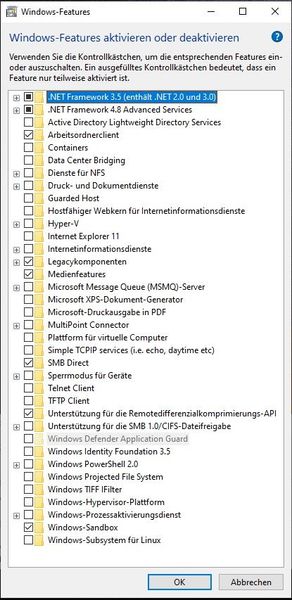
And because of that, i can't install it.
Also i install the Guard again with Powershell and found more logs in event viewer:
==================================================
Event Time        : 27.10.2019 14:45:38.707
Record ID         : 14
Event ID          : 205
Level             : Error
Channel           : Microsoft-Windows-WDAG-Service/Operational
Provider          : Microsoft-Windows-WDAG-Service
Description       : Fehler: HResult = Die Anforderung wird nicht unterstützt., Datei = windows\hvsi\hvsics\dll\hvsicontainerservicemodule.cpp, LineNumber = 647, Funktion = NULL, Meldung = NULL, CallingContext = NULL, Modul = hvsicontainerservice.dll, Code = NULL,
Opcode            :
Task              :
Keywords          : 0x8000000000000000
Process ID        : 3740
Thread ID         : 5592
Computer          : DESKTOP-A5RA9DJ
User              : NT-AUTORITÄT\SYSTEM
==================================================

==================================================
Event Time        : 27.10.2019 14:45:38.707
Record ID         : 15
Event ID          : 200
Level             : Error
Channel           : Microsoft-Windows-WDAG-Service/Operational
Provider          : Microsoft-Windows-WDAG-Service
Description       : Fehler beim Starten des Containerdiensts. HR:Die Anforderung wird nicht unterstützt. Meldung:
Opcode            :
Task              :
Keywords          : 0x8000000000000000
Process ID        : 3740
Thread ID         : 5592
Computer          : DESKTOP-A5RA9DJ
User              : NT-AUTORITÄT\SYSTEM
==================================================

==================================================
Event Time        : 25.10.2019 18:50:18.258
Record ID         : 6
Event ID          : 205
Level             : Error
Channel           : Microsoft-Windows-WDAG-Service/Operational
Provider          : Microsoft-Windows-WDAG-Service
Description       : Fehler: HResult = Die Anforderung wird nicht unterstützt., Datei = windows\hvsi\hvsics\dll\hvsicontainerservicemodule.cpp, LineNumber = 647, Funktion = NULL, Meldung = NULL, CallingContext = NULL, Modul = hvsicontainerservice.dll, Code = NULL,
Opcode            :
Task              :
Keywords          : 0x8000000000000000
Process ID        : 8396
Thread ID         : 1008
Computer          : DESKTOP-A5RA9DJ
User              : NT-AUTORITÄT\SYSTEM
==================================================

==================================================
Event Time        : 27.10.2019 14:45:38.707
Record ID         : 16
Event ID          : 205
Level             : Error
Channel           : Microsoft-Windows-WDAG-Service/Operational
Provider          : Microsoft-Windows-WDAG-Service
Description       : Fehler: HResult = Die Komponente wurde nicht initialisiert., Datei = windows\hvsi\settings\host\settingslib\hostsettingslib.cpp, LineNumber = 1161, Funktion = NULL, Meldung = NULL, CallingContext = NULL, Modul = hvsicontainerservice.dll, Code = NULL,
Opcode            :
Task              :
Keywords          : 0x8000000000000000
Process ID        : 3740
Thread ID         : 5592
Computer          : DESKTOP-A5RA9DJ
User              : NT-AUTORITÄT\SYSTEM
==================================================
Also see my attachment which include the event viewer data
- HotCakeXOct 27, 2019MVP
Deleted
Spoiler
Deleted wrote:HotCakeXToday i check my event viewer and i found stuff!
Die Mindestanforderung wird vom System nicht erfüllt: The system does not meet the minimal requirement.
Number of processors required:4, actual:12.
Gigabytes of RAM required:8, actual:0.
Gigabytes of free disk space required: 5, actual:165
Wim path exists: 1Why it say that i have 0GB RAM? I have 16GB
And because of that, i can't install it.
Also i install the Guard again with Powershell and found more logs in event viewer:
==================================================
Event Time        : 27.10.2019 14:45:38.707
Record ID         : 14
Event ID          : 205
Level             : Error
Channel           : Microsoft-Windows-WDAG-Service/Operational
Provider          : Microsoft-Windows-WDAG-Service
Description       : Fehler: HResult = Die Anforderung wird nicht unterstützt., Datei = windows\hvsi\hvsics\dll\hvsicontainerservicemodule.cpp, LineNumber = 647, Funktion = NULL, Meldung = NULL, CallingContext = NULL, Modul = hvsicontainerservice.dll, Code = NULL,
Opcode            :
Task              :
Keywords          : 0x8000000000000000
Process ID        : 3740
Thread ID         : 5592
Computer          : DESKTOP-A5RA9DJ
User              : NT-AUTORITÄT\SYSTEM
==================================================

==================================================
Event Time        : 27.10.2019 14:45:38.707
Record ID         : 15
Event ID          : 200
Level             : Error
Channel           : Microsoft-Windows-WDAG-Service/Operational
Provider          : Microsoft-Windows-WDAG-Service
Description       : Fehler beim Starten des Containerdiensts. HR:Die Anforderung wird nicht unterstützt. Meldung:
Opcode            :
Task              :
Keywords          : 0x8000000000000000
Process ID        : 3740
Thread ID         : 5592
Computer          : DESKTOP-A5RA9DJ
User              : NT-AUTORITÄT\SYSTEM
==================================================

==================================================
Event Time        : 25.10.2019 18:50:18.258
Record ID         : 6
Event ID          : 205
Level             : Error
Channel           : Microsoft-Windows-WDAG-Service/Operational
Provider          : Microsoft-Windows-WDAG-Service
Description       : Fehler: HResult = Die Anforderung wird nicht unterstützt., Datei = windows\hvsi\hvsics\dll\hvsicontainerservicemodule.cpp, LineNumber = 647, Funktion = NULL, Meldung = NULL, CallingContext = NULL, Modul = hvsicontainerservice.dll, Code = NULL,
Opcode            :
Task              :
Keywords          : 0x8000000000000000
Process ID        : 8396
Thread ID         : 1008
Computer          : DESKTOP-A5RA9DJ
User              : NT-AUTORITÄT\SYSTEM
==================================================

==================================================
Event Time        : 27.10.2019 14:45:38.707
Record ID         : 16
Event ID          : 205
Level             : Error
Channel           : Microsoft-Windows-WDAG-Service/Operational
Provider          : Microsoft-Windows-WDAG-Service
Description       : Fehler: HResult = Die Komponente wurde nicht initialisiert., Datei = windows\hvsi\settings\host\settingslib\hostsettingslib.cpp, LineNumber = 1161, Funktion = NULL, Meldung = NULL, CallingContext = NULL, Modul = hvsicontainerservice.dll, Code = NULL,
Opcode            :
Task              :
Keywords          : 0x8000000000000000
Process ID        : 3740
Thread ID         : 5592
Computer          : DESKTOP-A5RA9DJ
User              : NT-AUTORITÄT\SYSTEM
==================================================
Also see my attachment which include the event viewer data
That's strange, must be a bug, again I'm skeptical about the whole build 1909, I have no idea why Microsoft put it on the front page for everyone to download while they said they're going to release it to public in Nov 12, it is currently being finalized in the release preview ring.
anyhow, I'm on Insider build fast ring 2003 and WDAG is fine.
I think you should report it in the Feedbacks hub app and add your even viewer file to your feedback.
- AnonymousOct 27, 2019Now i set the RAM recommended hardware configuration to 0GB, reboot and it fully works.
But still don't know why Windows think i have 0GB RAM. The logic looks corrupt
Taskmanager even say i have 16GB and ATM 12GB are free.- HotCakeXOct 27, 2019MVP
Deleted
Deleted wrote:
Now i set the RAM recommended hardware configuration to 0GB, reboot and it fully works.
But still don't know why Windows think i have 0GB RAM. The logic looks corrupt
Taskmanager even say i have 16GB and ATM 12GB are free.Nice, that's good,
would you mind mentioning how you managed to modify the recommended RAM for WDAG?
- AnonymousOct 27, 2019
I think you should report it in the Feedbacks hub app and add your even viewer file to your feedback.
I hope they read this here.
HotCakeX wrote:Deleted
Deleted wrote:
Now i set the RAM recommended hardware configuration to 0GB, reboot and it fully works.
But still don't know why Windows think i have 0GB RAM. The logic looks corrupt
Taskmanager even say i have 16GB and ATM 12GB are free.Nice, that's good,
would you mind mentioning how you managed to modify the recommended RAM for WDAG?
Sure. I follow the https://docs.microsoft.com/en-us/windows/security/threat-protection/windows-defender-application-guard/faq-wd-app-guard#frequently-asked-questions and change the minimum RAM to 0GB with create the DWORD string "SpecRequiredMemoryInGB" with value "0" under "HKLM\software\Microsoft\Hvsi\"
Then i reboot and installation wasn't greyout and i can it install in official way, without Powershell. Also in Edge and Windows Defender i have the option to use/ config the Application Guard.