Forum Discussion

Windows asks for administrator permission often
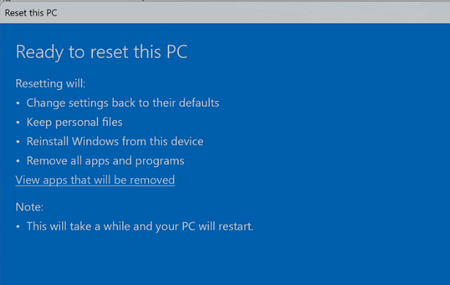

First, the screen in your picture is not a UAC prompt. It is the final confirmation for Reset this PC, which will remove your installed applications. Select Cancel; resetting Windows is not an appropriate fix for frequent permission prompts.
Being the only user does not prevent UAC prompts. Even an administrator normally runs programs with standard permissions, and Windows asks for approval when something needs elevated access.
To reduce unnecessary prompts safely:
- Search for Change User Account Control settings. If the slider is set to Always notify, move it to the default level: Notify me only when apps try to make changes to my computer. If it is already at the default level, leave it there.
- For programs that prompt every time, right-click their shortcuts and open Properties. Under Compatibility, clear Run this program as an administrator if the program does not genuinely require it. Also check Shortcut > Advanced for the same option.
- Update or reinstall older programs that request elevation unnecessarily. Some older applications try to write inside protected folders such as Program Files.
- Store and edit your own files under Documents, Pictures or another folder inside your user profile. Moving files into Windows, Program Files or the root of the system drive normally requires approval.
- If a prompt appears unexpectedly or while you are not opening anything, select No and run a full Windows Security scan.
If the prompt asks for an administrator password instead of showing a simple Yes button, check your account type under Control Panel > User Accounts. Being the only account does not automatically mean it has administrator rights.
Do not disable UAC or change permissions on the Windows and Program Files folders, as that would weaken system security.