Forum Discussion

Alice77
May 26, 2026Tin Contributor
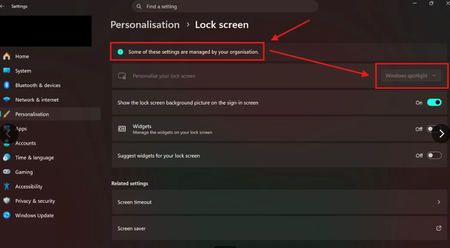
Windows 10 Computer Spotlight Greyed Out
I'm trying to make my lock screen look as clean as possible and now I cant remove the tips that no one even reads. I'm still in school and have logged out of the account (only logged in with my ...

KapilArya
May 30, 2026MVP
Hi,
Please check if any of the Group Policy at this location is configured for Windows Spotlight:
User Configuration > Administrative Templates > Cloud Content
Ensure Configure Windows Spotlight on lock screen is set to Enabled.
If you're on Windows 10 Home, you might not have Group Policy, so you can check registry configuration related to Windows Spotlight, as shown in this fix (works with Windows 10):
https://www.kapilarya.com/enable-or-disable-windows-spotlight-in-windows-11
Let us know if this helps!
Note: Included link in this reply refers to blog by a trusted Microsoft MVP.