Forum Discussion

OakleyCruz
Sep 17, 2026Iron Contributor
Windows + Print Screen no longer works – it just removes window borders
I used to use Windows Key + Print Screen all the time to take quick screenshots, but lately it just stopped working. Now when I press it, it doesn't save a screenshot at all—instead, it seems to remo...

Michelle_Scott77
Sep 17, 2026Brass Contributor
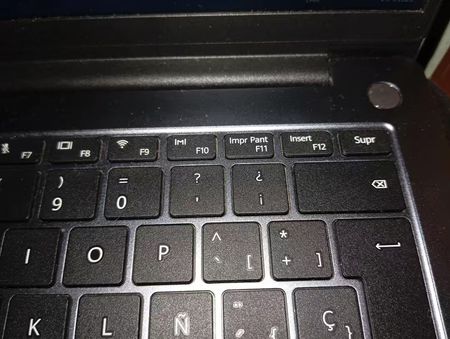
Your keyboard has Print Screen and F11 on the same key.
That key can do two different things: take a screenshot, or send F11, which switches many apps into full-screen mode. The disappearing top and bottom bars suggest you are getting the F11 function.
Try adding Fn to your usual shortcut:
- Hold down Windows + Fn.
- While holding both, press the key labelled Impr Pant / F11 once.
- Release the keys and check Pictures > Screenshots. If your Pictures folder is in OneDrive, check there.
If this saves a screenshot, you can simply use Windows + Fn + Impr Pant from now on. You do not need to change any Windows settings.
To bring back the missing bars, click inside the affected window and press the Impr Pant / F11 key on its own. If that does not exit full screen, try Fn + that key.