Forum Discussion

Why am I getting this "Let's finish setting up your device" blue screen?
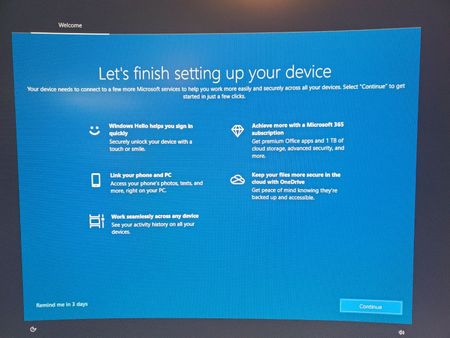
- Oct 07, 2020
Hello Rod-F,
Go to Settings > System > Notifications & actions and uncheck Suggest ways I can finish setting up my device to get the most out of Windows option. This should turn off that screen.
If that doesn't works, try the registry based Method 2 mentioned here:
https://www.kapilarya.com/how-to-disable-get-even-more-out-of-windows-screen-windows-10
To help you more on this, here's the video fix:Hope this helps!
Note: Included link in this reply refers to blog post by a trusted Microsoft MVP.
*This reply was updated with additional information.


Sorry, I have a dissenting opinion.
I work in an educational environment.
We have over 200 public and 300+ staff PC's running on WIN10 version 21H2.
The public PC's have a software FREEZE applied to prevent accidental virus's or hard drive erasure.
Or software / malware installs.
"Let's finish setting up your device" pops up regularly, every couple months.
We un-freeze, clear the, Blue Screen, re-freeze and darned if it doesn't return.
Randomly and sporadically on these PC's. No consistent pattern or schedule.
It's Continuous labor, off schedule.
Delaying other projects

I'm sure a bunch of us here are working in education/public service/etc. We use Faronics Deep Freeze at a few of my sites and have used things like Clean Slate, Centurion Guard (with and without hardware keys), and even Steady State back in the XP days.
Deep Freeze works fine with the public Win10 computers but you need to set them correctly with group policies and if you have upwards of 200 PCs then you'd be crazy NOT to be using WSUS along with GPOs tailored to those frozen PCs. Using WSUS, Faronics, and proper GPOs on the frozen machines we haven't had any problems with these post-feature update screens because we are approving the updates from WSUS anyway (as one should in a production environment) and can easily tell when the screens might appear.
It's all the OTHER random machines that are annoying (home, small sites, etc), because these screens would often cause the PC in question to not even load startup programs and some services.
It's gotten less bad with newer versions and if you have that many PCs, you should have an AD infrastructure in place already where this shouldn't be an issue. Check your WSUS and other GPO settings, especially the ones tailored to your frozen machines.