Forum Discussion

What the heck is going on with this? Black text in dark theme dialogues
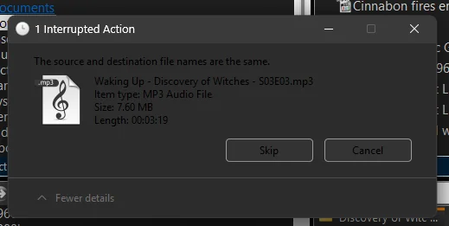

Because this appeared after years of transparency tweaks and RocketDock, first separate supported Windows themes from third-party customization. Switch Settings > Personalization > Colors to Light, restart, then select Dark. In Settings > Accessibility > Contrast themes, confirm None is selected unless you intentionally use one. Exit RocketDock and disable every theme patch, transparency utility, custom visual style, and shell extension, then sign out and back in. If text becomes readable, re-enable those components individually to identify the incompatible one. Install Windows and graphics-driver updates, then run DISM /Online /Cleanup-Image /RestoreHealth followed by sfc /scannow from an elevated command prompt. Test a new Windows profile. Microsoft notes that not every application supports dark mode, so one legacy dialog may remain light. If default themes work but the customized theme fails, its vendor must update it; Windows has no supported fix for patched theme resources.