Forum Discussion

There is no Virus & Threat Protection section at all in the Windows 10 Security Center
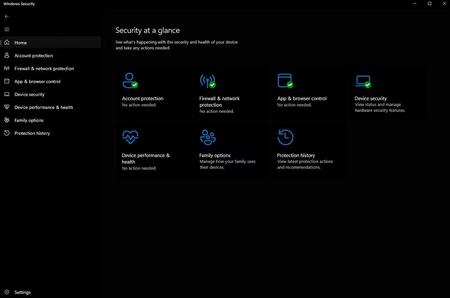

Try to remove school or work account from Settings > Accounts > Access work or school.
If you can't try these commands one-by-one and press Enter after each:
reg delete "HKLM\Software\Microsoft\Windows\CurrentVersion\Policies" /f
reg delete "HKLM\Software\Microsoft\WindowsSelfHost" /f
reg delete "HKLM\Software\Policies" /f
reg delete "HKLM\Software\WOW6432Node\Microsoft\Policies" /f
reg delete "HKLM\Software\WOW6432Node\Microsoft\Windows\CurrentVersion\Policies" /f
reg delete "HKLM\SOFTWARE\Policies\Microsoft\Windows Defender" /v DisableAntiSpyware
reg delete "HKCU\Software\Microsoft\Windows\CurrentVersion\Policies" /f
reg delete "HKCU\Software\Microsoft\WindowsSelfHost" /f
reg delete "HKCU\Software\Policies" /f
reg delete "HKLM\Software\Microsoft\Policies" /f
Then close Command Prompt and restart your system.
If issue still persists, refer this fix:
https://www.kapilarya.com/fix-cant-access-virus-and-threat-protection-on-windows-security
Let us know if this helps!
Note: Included link in this reply refers to blog post by a trusted Microsoft MVP.