Forum Discussion

There is no Virus & Threat Protection section at all in the Windows 10 Security Center
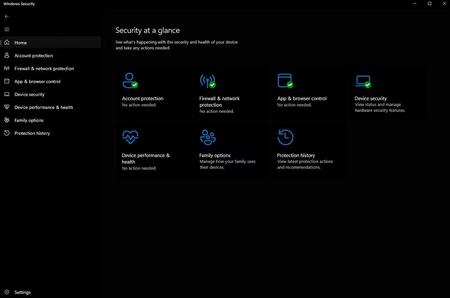

Your personal Windows 10 install is showing “managed by your administrator” and Virus & threat protection is absent. That page normally contains Microsoft Defender Antivirus and third-party antivirus controls, so its absence usually reflects an active security product or policy rather than a permissions problem. Check Settings > Apps for antivirus, VPN security suites, or endpoint-management tools, then use the vendor’s supported uninstall method and restart. In Windows Security, open Settings > About and note the policy information. Also check Settings > Accounts > Access work or school and disconnect an old organization connection only if it is no longer needed. Install Windows updates, then run DISM followed by SFC. Avoid registry “Defender disable” fixes from forums; they can leave protection inconsistent. If no work account or security product remains, use the Windows Security Get Help troubleshooter or Microsoft Support with the policy details.