Forum Discussion

System Malfunction After Installing Windows 10 22H2
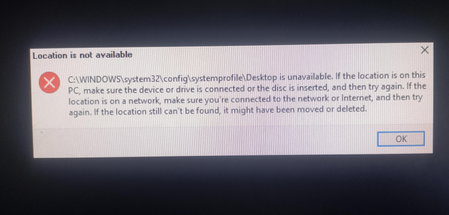

Explorer became sluggish after 22H2, but the screenshot adds an important clue: Windows cannot open C:/WINDOWS/system32/config/systemprofile/Desktop. That identifies an unavailable Desktop location; it does not establish a search-index problem or prove that every personal file is intact.
Back up the files you can access before further repairs. Then test File Explorer while signed into a newly created user account. If browsing works there, investigate the original profile rather than copying personal folders into systemprofile or changing registry paths blindly.
From an administrator Command Prompt, run DISM.exe /Online /Cleanup-Image /RestoreHealth. After successful completion, run sfc /scannow and record both results. These repair Windows components and protected system files.
If the issue persists, share the exact winver build, whether the new account behaves differently, and the missing third screenshot. Those results are needed before choosing profile repair or a supported recovery option.