Forum Discussion

Easmkom
Nov 06, 2026Iron Contributor
System Malfunction After Installing Windows 10 22H2
After installing Windows 10 22H2, my computer started having issues. I've spent several hours troubleshooting and fixed some pop-up errors using video tutorials and AI suggestions, but the system sti...
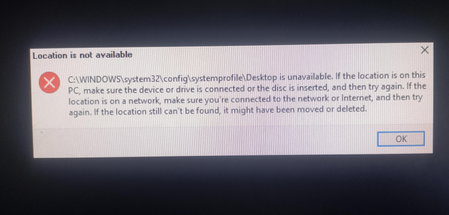

syserrorlog
Nov 06, 2026Brass Contributor
Since you can see everything in CMD, your files are definitely safe, so don't panic about losing data. It sounds like the 22H2 update just broke the desktop folder mappings or left File Explorer hanging on a corrupted search index cache.
Before doing an uninstallation, try a quick index rebuild. It usually forces Explorer to see the folders again:
1. Open the classic Control Panel and go to Indexing Options.
2. Click Advanced, and then hit Rebuild.
Let Windows re-scan the file paths in the background. Does that bring the folders back, or is the whole Explorer window still completely locked up when you try to browse?