Forum Discussion

Dikki845
Jul 23, 2022Copper Contributor
Some settings are managed....
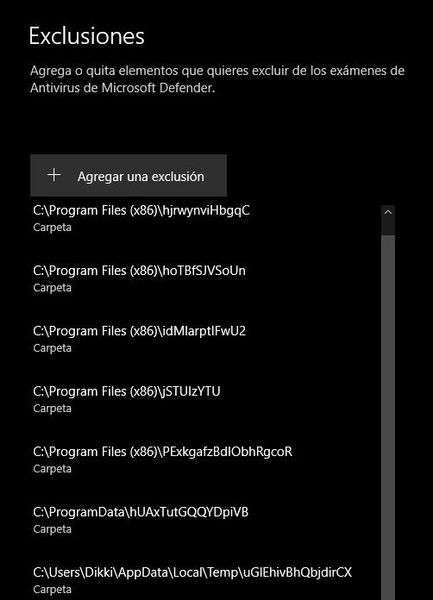
(Translated from Spanish) Greetings, I am contacting you to see if you can help me to solve the problem finally (I have already gone in community in community page and page and this is becoming t...

Jameswalter
Jul 25, 2022Tin Contributor
1 Open Windows Security, and click/tap on the Virus & threat protection icon.
2 Click/tap on the Manage settings link under Virus & threat protection settings.
3 Click/tap on the Add or remove exclusions link under Exclusions.
4 Click/tap on an added exclusion that you want to remove, and click/tap on its Remove button.
5 Click/tap on Yes when prompted by UAC to approve.
6 Repeat step 4 above if you would like to remove another exclusion.
7 When finished, you can close Settings if you like.
This may help,
JamesW
2 Click/tap on the Manage settings link under Virus & threat protection settings.
3 Click/tap on the Add or remove exclusions link under Exclusions.
4 Click/tap on an added exclusion that you want to remove, and click/tap on its Remove button.
5 Click/tap on Yes when prompted by UAC to approve.
6 Repeat step 4 above if you would like to remove another exclusion.
7 When finished, you can close Settings if you like.
This may help,
JamesW

Dikki845
Jul 27, 2022Copper Contributor
Jameswalter thanks for your time, but I repeat... When entering "add/remove" exclusions, when I select a file the "remove" button appears gray and I cannot press it. That's why I wonder if there is another way to delete it, or if the files that come out are harmless.
Image to illustrate: