Forum Discussion

Secure boot activated the computer no longer launches, repair mode
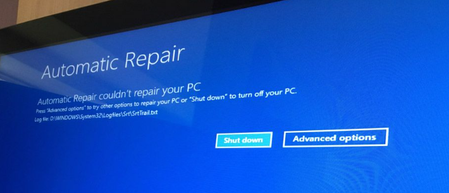

Most probably, your disk is partitioned using MBR instead of GPT, which does not support secure boot. If it is not, turn off secure boot in BIOS and boot normally into Windows. Once you're in, launch Command Prompt as administrator and run the following commands to restore your boot record.
Warning: Even though these processes aren't supposed to cause loss of data, it is always advisable to have everything backed up and unplug everything except the main system drive to avoid accidental operations.
bootrec /fixmbr
bootrec /fixboot
bootrec /rebuildbcd
If there is an "Access denied" error, it is probably because your Windows drive utilizes an MBR partition table. You can check it using diskpart. (Run > diskpart > list disk) If there isn't an asterisk (*) next to your Windows drive below the GPT column, it is an MBR-formatted disk and the only way to have a working Windows installation while having secure boot enabled is to use the mbr2gpt tool to convert the partition table to GPT as given below.
- Use the following command to check if your Windows disk partition can be converted to GPT.
mbr2gpt /validate /allowFullOS- If the output is "Validation completed successfully", you can proceed to the next step. If it isn't, you probably have more than 4 partitions. Use Disk Management to check that (Run > diskmgmt.msc). If that is the case, you can move everything to the third partition, erase everything from either the partitions after the third one, or the https://askubuntu.com/questions/1244012/what-is-the-difference-between-filesystem-and-extended-partition-in-disks, and extend the third partition to reduce partition count to four. Please take the time to review whether the partitions you're deleting are not essential system partitions. After you're done, check with the first command again, then proceed to the command below.
mbr2gpt /convert /allowFullOSThis should convert your disk. You can then run the first three bootrec commands to add your bootloader signature to be used with secure boot. Thereafter, reboot into BIOS and turn secure boot on.
If you don't understand any section, please take your time to learn about it instead of blindly running the commands. I'll be happy to help if you can't find any references on the web about something I said.