Forum Discussion

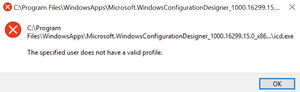
"The specified user does not have a valid profile" error on apps downloaded from Microsoft Store
 May 22, 2018
I solved the problem by moving the folder with the install files from the WindowsApps (which is hidden by default) into a user folder (e.g. Documents) and start the executable from there.
WindowsApps directory seems to have insufficient permissions for standard users after the OS Release in April . At least ubuntu is now running again without any problem. I am using 1803 Build 17134.1
I have the same issue. It gives me the error message "the specified user does not have a valid profile" and nothing I do helps. Can anyone suggest something. Whenever I try to move the folder location my computer just tells me that the system doesn't approve and it wont let me move the files from my c drive to my documents folder. Please help

The issue that I had related to updating windows 10 it gave me the same error message Vuchh . It later transpired that 'Cloudpaging Player' that was running in the background prevented the windows updater completing. When I forced stopped the program 'Cloudpaging Player' the windows updater was able to complete successfully. This message then disappeared after the completed update and I could then run all programs as before, including Cloudpaging Player. I hope this helps.