Forum Discussion

Potential Virus on Grandma's Computer – Scans Show Nothing
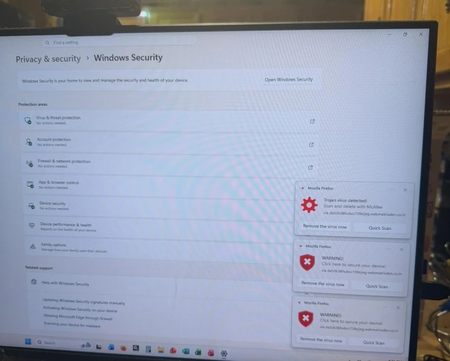

The screenshots are browser notifications, not Windows Security alerts: each toast is labeled Mozilla Firefox and shows an unfamiliar domain, while Windows Security reports no actions needed. This strongly supports a website-notification scam rather than proof of infection. Do not select its buttons, call a number, install software, or grant remote access. In Firefox, open notification permissions, remove or block that domain and unrecognized sites, then clear that site’s data. Close suspicious tabs and remove unknown extensions. Update Windows and Firefox. Run one Windows Security Full scan; because Microsoft Defender Offline already returned clean, repeated scans will not remove a retained browser permission. Check installed apps and startup items for anything unfamiliar. If she entered credentials or payment information, or allowed remote control, disconnect the PC, remove remote-access software, change passwords from a clean device, and contact the bank. Microsoft documents that scam sites use fake pop-ups and fear tactics.