Forum Discussion

Msinfo32.exe not able to open .nfo files
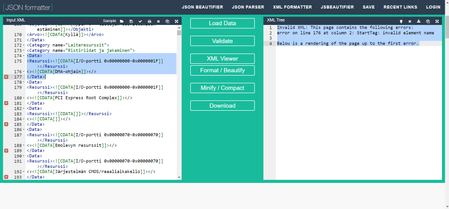

the file size is not the problem. A ~3.6 MB .nfo is completely normal for msinfo32.
What’s breaking it is invalid XML inside the file.
What’s actually happening
An .nfo generated by msinfo32 is basically an XML file.
If even one XML tag is malformed, msinfo32 will refuse to open it and show the “corrupt or incompatible” message.From what you found in the XML viewer:
- Tags like <> and </> are not valid XML
- Missing or empty tag names will break the parser
- Once that happens, msinfo32 can’t load the file, even though the file exists
So yes — those XML errors directly explain why msinfo32 can’t open the .nfo.
Why this happens
This is a known msinfo32 bug, usually triggered by:
- Certain hardware / driver entries
- Localized (non-English) strings
- Special characters written incorrectly into the XML
When msinfo32 hits one of these, it still saves the file — but saves it broken.
What you can do (practical fixes)
1. Generate the NFO in Safe Mode
This often skips problematic drivers and produces a valid file.2. Export as .txt instead of .nfo
msinfo32 → File → Export
Most vendors accept TXT and it avoids XML entirely.3. Use “Save as” on another machine
Copy the system info via remote session and generate the file elsewhere.4. Manual workaround (advanced)
Open the .nfo in a text editor and remove the invalid empty tags — msinfo32 will usually open it after that.