Forum Discussion

Laptop battery stops charging at 79% instead of 80%
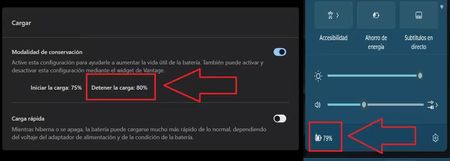

Stopping at 79% while Lenovo Vantage is configured for an 80% limit is normally harmless. Battery percentage is an estimate derived from voltage, temperature, charge history, and firmware calibration, not an exact counter, so a one-point difference does not indicate failure. Confirm that Vantage’s conservation setting is enabled, then leave the original Lenovo charger connected for an hour and restart once. Update Windows, Lenovo Vantage, BIOS, chipset, and power-management firmware through Lenovo’s supported channels. Generate a report with powercfg /batteryreport and compare Full Charge Capacity with Design Capacity; the 79% threshold is not the relevant health measurement. Avoid repeatedly discharging to zero to force calibration, because deep discharge accelerates lithium-ion wear. Microsoft recommends moderate charging ranges and Smart charging where supported. If the stopping point falls substantially below the configured threshold, charging becomes intermittent, or the battery is swollen or unusually hot, stop testing and contact Lenovo for hardware service.