Forum Discussion

Is it safe to delete the previous Windows 10 installation files?
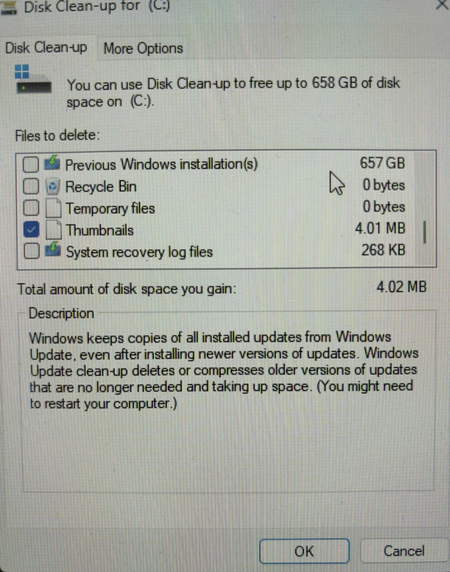

The 657 GB item shown is the previous Windows installation in Windows.old. You can remove it without disrupting the current installation if Windows is working correctly, but the choice is permanent: Windows will no longer be able to use “Go back” to restore the earlier version. Before deleting it, open Settings > Update & Security > Recovery and decide whether you still need the Go back option. Also check Windows.old for any personal files that were not carried into the current installation and copy anything needed to another drive. Then reopen Disk Cleanup as administrator, choose Clean up system files, select Previous Windows installation(s), and confirm Delete Files. Keep the PC powered on until cleanup finishes. If the current installation has driver, application, or stability problems, do not delete it yet. After deletion, returning to the earlier version would require installation media and a reinstall rather than the built-in rollback.