Forum Discussion

Porterwer
Aug 26, 2024Iron Contributor
I have left Windows beta but still receiving preview builds?
- Nov 08, 2024
If all else fails and you’re still receiving preview builds, you may consider doing a clean installation of Windows 10/11. This is to ensure you're starting fresh without any Insider configurations.


Eommy
Aug 27, 2024Silver Contributor
1.Check Insider Program settings:
Go to Settings > Update and Security > Windows Insider Program and make sure it's fully exited.
2.Exit Insider Builds:
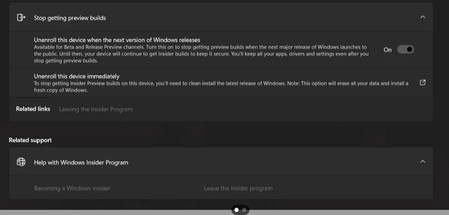
If the Preview option is still available, make sure you click “Stop getting previews”.
3.Restart your computer:
After changing the settings, restart your computer for the changes to take effect.
4.Check Windows Update settings:
Go to Settings > Update & Security > Windows Update and make sure there are no Insider updates settings.
5.Remove optional updates:
Go to Settings > Update and Security > Windows Update > View optional updates and deselect the Preview update.
6.Reinstall Windows (if necessary):
If the above steps do not work, consider reinstalling Windows 10 or 11.
Go to Settings > Update and Security > Windows Insider Program and make sure it's fully exited.
2.Exit Insider Builds:
If the Preview option is still available, make sure you click “Stop getting previews”.
3.Restart your computer:
After changing the settings, restart your computer for the changes to take effect.
4.Check Windows Update settings:
Go to Settings > Update & Security > Windows Update and make sure there are no Insider updates settings.
5.Remove optional updates:
Go to Settings > Update and Security > Windows Update > View optional updates and deselect the Preview update.
6.Reinstall Windows (if necessary):
If the above steps do not work, consider reinstalling Windows 10 or 11.